
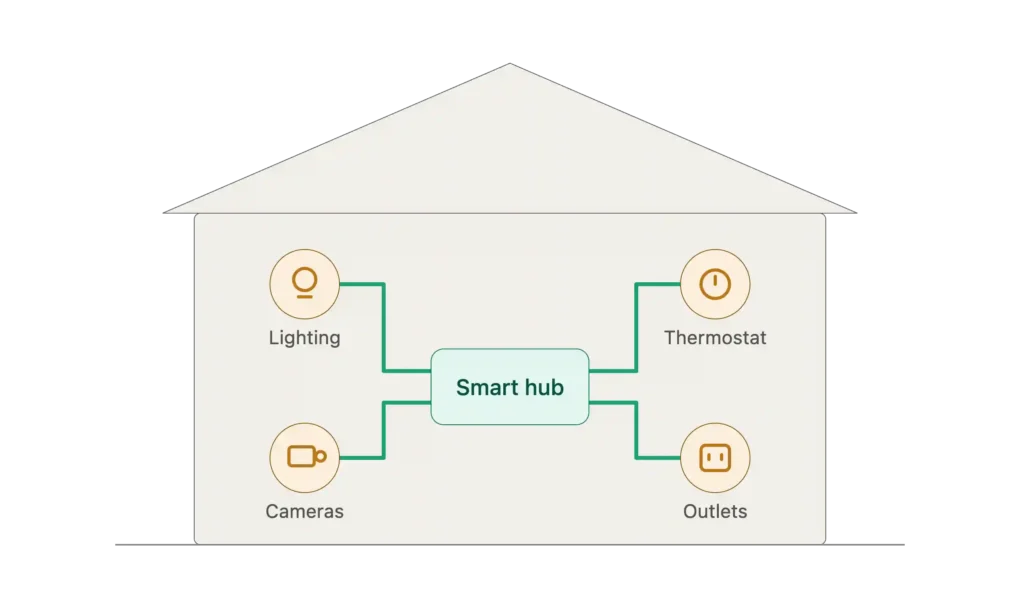
Just a couple of decades ago, smart homes were the preserve of sci-fi films or just the uber-wealthy. Nowadays, they’re decidedly mundane: affordable, relatively easy to set up and an increasingly common sight on British streets, although for the untrained eye they might be hard to spot. As the face of Finney Electrical and a local sparkie, I’m often asked about smart home wiring: what it entails, how much the average DIYer can get away with installing solo, what benefits it’ll bring, and the underlying question, how much will it cost?
In this guide, I’ll be giving away my expertise for free. By the end, you’ll have a crystal-clear picture of the process and know exactly which questions to have in your back pocket when the time comes for a quote.
Meet the Expert
Hello, I’m James Finney, owner and top electrician at Finney Electrical. I’ve been running my business for almost a decade, but I also dabble in YouTube in the home tech space.
Key Takeaways
- Smart home wiring is the skeleton of any decent system, despite wireless convenience
- PoE is the gold standard for cabling, bringing power and data together for sensors, cameras, touchscreens and other security gadgets
- Plan room-by-room and around future capacity to meet both current and evolving needs
What Makes a Smart Home ‘Smart’?
84% of Brits own at least one smart home device. Yet I find that, among the homeowners I speak to, there are still many misconceptions floating around. Many folks are unsure exactly when a house crosses the line from a property containing smart devices into fully blown smart home territory.
Essentially, a smart home is the interface between your smart devices. Instead of an intelligent light fitting or thermostat doing its thing in isolation, every internet-connected, compatible gadget under your roof is linked up, so they can communicate and share information within a unified system.
The techy term is the Internet of Things (IoT), but basically, it means that you can control everything through an app on your smartphone/tablet or using a smart home hub, such as Apple Home, Home Assistant, Alexa or Hubitat.
This is where things get a little space-age-y. Set up correctly, you’ll have pinpoint control over the running of your home, from curating the vibe right down to its precise, room-by-room climate (think: heating, humidity and ventilation). You can have your favourite song follow you throughout the house, (un)lock doors for visitors and tradespeople, even turn up the chill on your fridge during a heat wave – completely remotely.
Or, if you do happen to be home, those annoying chores preventing you from being a cosy puddle on the sofa don’t need to steal you away from Netflix: adjust your lawn sprinklers, charge up your EV, roll the blinds down, check deliveries through your door cam, without taking a step.
Sometimes, it’s not even ‘at the click of a button’; you simply need to utter the word, and your home will respond accordingly.
How Does Smart Home Tech Work?
Beneath the intelligent veneer is actually a very simple system that anyone can get their head around. Each smart device in the network is looped in via your broadband router, either directly over Wi-Fi or through one of the central hubs I mentioned earlier – although I tend to recommend the latter as it rules out the need to juggle multiple apps.
Speaking of apps, these function as the ‘control centre’ of your smart home, where you can manage each device and get super nerdy over the analytics and energy-saving features.
Getting started can be as simple or as complex as you’re comfortable with. Many people dip their toes in with a handful of smart bulbs; an outlet plug here and there, or just a TV upgrade. All of which you can get set up on your own, no worries.
However, the more substantial upgrades – full light fixtures, ovens, garage doors, home-wide security systems and sensors, refrigerators and the like – take proper planning and outside assistance to install, in large part because of their higher energy consumption and specialist hardware. So, if you’re after the quiet luxury of an invisible system or circadian lighting to sync your body to the sun throughout your home, you need a reliable foundation in place first.
Wiring Infrastructure, The Backbone of Your Smart Home
Smart homes, though they cater to your every whim, aren’t a genie in a bottle kind of deal. They require proper infrastructure to achieve the frictionless day-to-day experience we all envy. And the level of that infrastructure depends entirely upon your property’s architecture, Wi-Fi reliability, existing wiring and smart home coverage.
The reality is that the more energy-sapping smart home devices you cram under your roof, the more strain on your circuits. One of the cruxes of the issue comes down to the ‘always on’ programming of many intelligent gadgets. Constantly scanning the environment for changes and waiting upon commands, 24/7 connectivity means higher standby power draws than their “dumber” counterparts – particularly if we’re talking about energy-intensive installations, like automatic gates or EV chargers.
Obviously, smaller things, like a Ring Doorbell, don’t suck up too much electricity. But, collectively, a sweeping network can push up your utility bill if you’re not careful.
In these cases, rewiring your home so that these ‘energy vampires’ are hooked up to a dedicated circuit is often the sensible choice. Here’s why:
- It guarantees stable connectivity
- Power fluctuations are dealt with, so you can preserve the longevity of your tech, smart or “dumb”
- It’s also a safety issue; new wiring to contemporary compliance standards translates into a more protected, more efficient system, saving you stress and £s on your energy bills
- You can accommodate smart switches, which typically need neutral wire to run to their respective locations, placing them wherever you need them
- Hardwired network cabling is a shortcut to the speed, stability, future-proofing and convenience families require, especially in older properties where thick, stone walls cause havoc as interference
- If you already need to upgrade a component, for instance, because the current setup doesn’t meet the required capacity, it makes sense to design your electricals around your smart home from the ground up
- This gives you the wiggle room to extend the scope later down the line, no eye-watering remedial work necessary
- Plus, it grants homeowners the peace of mind that they can comfortably age in place
These solid foundations, built around your lifestyle and home’s character, ensure your electricals can cope with your estimated power usage, now and in the future. While they do require a larger commitment than a handful of smart bulbs, the good news is that the renovation work is minor, relatively speaking.
7 Questions to Ask Yourself Before Committing to the Project
Effective residential technology is always well planned and seamlessly integrated, to the point that it becomes an invisible part of the design. To make sure yours stays discreet as it simplifies your day-to-day living, ask yourself these guiding questions. The answers will be your north star throughout the project.
- What is your chief objective of the project? Home security, energy efficiency, convenience, multimedia integration or a luxe living experience?
- Which parts of the home do you intend to automate?
- Is the property suitable for smart home installation? And, if not right now, what steps are needed to improve compatibility?
- Which smart home setup is more suitable, wired or wireless? In my experience, wireless is handy if you’re retrofitting, but the system is vulnerable to power outages. Wired, although more expensive and renovation-dependent, tends to be more reliable, unlocking greater sustainability in the long haul.
- Can the system be expanded in the future? This is a big one, if you see little ones in your future!
- What are your devices’ requirements, and how do they connect within the network?
- How far will your budget realistically stretch?
Smart Home Wiring FAQs
What is Smart Home Wiring?
The physical foundation of any decent, future-proofed smart home. It uses carefully planned, low-voltage and data cabling – sometimes both in one, as with PoE – to deliver quality uptime, better bandwidth and superior scalability.
What are the Core Cable Types?
Cat6 or Cat6A Ethernet are used for high-speed data and local networking; BUS cabling is the top choice for hardwired automation systems; coaxial and speaker cables connect multi-room audio and home cinema setups to the smart home system. The industry gold standard is Power Over Ethernet, or PoE, which combines data and low-voltage current into one cable, since it’s more efficient and convenient for devices that handle both.
What are Some Smart Wiring Best Practices?
My no.1 tip is to increase capacity beyond current use, so the system can grow alongside your needs or evolving tech. I also use conduits inside customers’ walls so cables are easily accessed for future upgrades. Clear labelling, a centralised “home run”, and deep back boxes also go a long way to support your system’s long-term performance.
Conclusion: Take These Tips to the Heart of Your Home
From a tradie’s perspective, my favourite clients are those who know exactly what they want and have a clear vision of the final design. We can work closely together to build a dreamy system fit for the present day and with enough extra capacity to meet tomorrow’s needs.
With the right direction, even the most awkward interior can be a delight to experience, with the architectural soul of your home still intact. It just takes some confident decision-making.